Drivers are essential for running every computer. They perform different functions that improve the efficiency of the machine. However, updating and maintenance of these computer drivers is a crucial aspect that you should consider. SlimDrivers free is a fantastic driver management software used by millions in the entire world. SlimDrivers free provides dedicated tools that play a significant role in updating all the drivers of the computer accordingly. Therefore, the software is awesome for every operation of the machine because it has full control of these drivers. SlimDrivers works so well thanks to the database of drivers int the cloud. Below is a detailed guide on how the software operates.
How to Download SlimDrivers Free
To download the latest version of SlimDrivers Free click on the Download button below.
SlimDrivers Free: Scanning the Computer Automatically
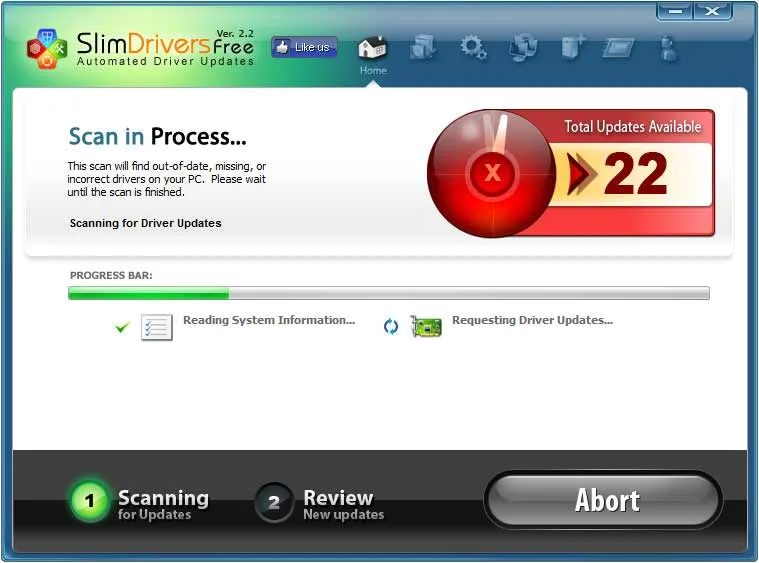
Your computer needs regular scanning to maintain its effectiveness and to keep it clean also in case a driver has a security hole. After the installation of SlimDrivers software into your computer, it scans it instantly. It always takes less than one minute to complete this process.
Showing the Outdated Drivers in SlimDrivers Free
The software displays all the outdated drivers to you. Additionally, it provides links that direct you to the new updates of the drivers. The aspect enables you to update all the computer drivers instantly and with ease. Therefore, it improves the functionality of the computer.
Uninstalling Obsolete Drivers
The software also necessitates the uninstallation process of all the outdated drivers on your computer. The process is essential because it enables you to equip the machine with new versions of the drivers, which allows you to use the computer without encountering unnecessary problems such as computer breakdowns.
Backup Drivers
SlimDrivers has vital tools that help in backing up the computer drivers. It might come in handy in case the newer drivers cause the PC to malfunction. The process of backing up all the existing drivers in your devices takes few minutes to complete. It enables you to choose all the necessary files and save them for future use. The software has a variety of options to select from.
System Requirements & Key Features
Review the Windows desktop compatibility baseline and recommended setup specifications for SlimDrivers Free 2.3.2.0 below before downloading.
| Specification | Minimum | Recommended |
|---|---|---|
| Operating System | Windows 7 / 8.1 / 10 (32-bit or 64-bit) | Windows 10 / 11 (64-bit) |
| Processor | 1.0 GHz Intel / AMD Dual-Core | 2.0 GHz+ Multi-Core CPU |
| Memory (RAM) | 2 GB RAM | 4 GB+ RAM |
| Free Disk Space | 500 MB free disk space | 1 GB+ SSD free space |
| Developer & Source | pysiagrusia.pl | Latest verified Windows build |
To round out your software toolkit safely, see our tested Windows overview of TeamViewer 15.83.5.
To round out your software toolkit safely, see our tested Windows overview of Microsoft Word 2016.
To round out your software toolkit safely, see our tested Windows overview of My Start Menu 1.25.
You may also appreciate our detailed comparison, ratings, and setup notes for AIDA64 Extreme 8.40.5000.
To round out your software toolkit safely, see our tested Windows overview of Desktop Restore 1.7.2.083.
To round out your software toolkit safely, see our tested Windows overview of PDF-XChange Editor 11.1.2.0.
To round out your software toolkit safely, see our tested Windows overview of Howard 2.20.
To round out your software toolkit safely, see our tested Windows overview of RIOT – Radical Image Optimization Tool 1.0.1.
To round out your software toolkit safely, see our tested overview of LogMeIn Hamachi.
Frequently Asked Questions
Where can I safely download SlimDrivers Free 2.3.2.0?
Use the download button on this page to get the official SlimDrivers Free 2.3.2.0 installer from Slimware Utilities for Windows PC.
Is SlimDrivers Free 2.3.2.0 free to download and use?
SlimDrivers Free 2.3.2.0 is offered under a official release license; see our specification box above for edition and licensing details.
Which operating systems are compatible with SlimDrivers Free 2.3.2.0?
SlimDrivers Free 2.3.2.0 is designed for Windows PC and installs cleanly using the standard setup package.
What are the main features of SlimDrivers Free 2.3.2.0?
Our review highlights performance, interface usability, everyday workflow tools, and key pros and cons of SlimDrivers Free 2.3.2.0.