I have been using MAME for years and even to this day, it is the best way to emulate the arcade experience at home. MAME has just gotten better and better and more user-friendly with each update. Still, with that being said, someone who is new to this type of thing and wants to play arcade classics at home should follow a guide, thankfully there are like a million on YouTube!
How to Download MAME
To download the latest release of MAME and its official ROMs, click on the Download button below. You will be able to get them from the official website.
The Program Review
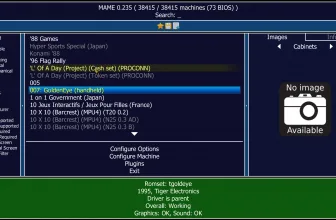
The whole point of MAME is to give you an emulator that is capable of emulating all different kinds of classic arcade machines. The majority of arcade games I have tried to play over the years have worked in MAME and more and more support is being added on what feels like a monthly basis.
You can play games that were never released at home or games where the arcade version is vastly superior. A great example for me is WWF WrestleMania The Arcade Game, yes it was released on multiple home consoles, but the arcade version is a million times better. With MAME, I can play this in the comfort of my own home.
MAME stands for Multiple Arcade Machine Emulator with the idea being that it is not just tied to one style of an arcade machine. Street Fighter from Capcom, Donkey Kong from Nintendo, Mortal Kombat from Midway, Dragon’s Lair from Cinematronic, Daytona USA by Sega, and a ton more can all be played using MAME.
When you use MAME, you have many different options available to you. I will say that options that let you tinker with the video and audio are probably for more advanced users. However, having access to various dip switches that let you change the difficulty as well as some other features of classic arcade games is something I think is cool and fun.
MAME offers you many different control options and you can set individual control options for different games if you wish. When I use MAME on my PC, I use a PlayStation 3 arcade stick and have done so for years without any problem. You can also use the keyboard or a controller if you wish and configuring these is very easy.
It is completely free to download MAME, and when you do download MAME you can get also access to a collection of ROMs on their website.
When it comes to arcade game emulation, I do not think there is anything better out there than MAME. I first started using MAME over 15 years ago and I continue to use it to this day. It has just gotten better and better and I can probably count on one hand the number of times I have had an issue with it playing a game. There is a bit of a learning curve, but there are many guides and videos out there that are easy to follow.
If you want another solid addition to your gaming library, take a look at our full guide to Super Mario Maker 2.
Gameplay Design, Features, and Core Value of MAME 0.289
MAME 0.289 focuses on responsive controls, reliable stability, and rewarding mechanics suited to Windows PC setups.
Compatibility, Performance, and Overall Replayability
From setup ease and system efficiency to long-term enjoyment, MAME 0.289 remains a dependable choice in our PC and gaming catalog.
PC System Requirements (Minimum & Recommended)
Check the verified Windows PC minimum and recommended hardware specifications for MAME 0.289 below before downloading.
| Component | Minimum | Recommended |
|---|---|---|
| OS | Windows 7 SP1 / 8.1 / 10 / 11 (64-bit) | Windows 10 / 11 (64-bit) |
| Processor | 64-bit dual-core 2.0 GHz Intel or AMD processor | High-IPC Intel Core i5 / AMD Ryzen 5 (3.5 GHz+ for 3D arcade boards) |
| Memory | 4 GB RAM | 8 GB – 16 GB RAM |
| Graphics | Direct3D 11 / OpenGL 3.2 / Vulkan compatible GPU | Dedicated GPU supporting HLSL / BGFX CRT shaders |
| Storage | 500 MB free space for MAME x64 binaries | 10 GB+ SSD space for ROM sets, CHD images, and artwork |
Frequently Asked Questions
What type of game is MAME 0.289 and who developed it?
MAME is an emulator of old computers, consoles and arcade machines. Download it now and play the great old games. It is developed or published by MAME Development Team.
Which platforms and stores offer MAME 0.289?
Official digital editions of MAME 0.289 are available via GitHub Releases and mamedev.org. Key technical details: supported platforms include Windows XP, Windows Vista, Windows 7, and Windows 8; storage requirement is roughly 82 MB; pricing follows a free model.
What are the main strengths and drawbacks of MAME 0.289?
Standout strengths include broad arcade machine compatibility covering classics from Capcom, Sega, Nintendo, and Midway, per-game control mapping for arcade sticks or gamepads, and adjustable dip-switch settings. On the downside, newcomers face an initial learning curve best tackled with tutorials, and video/audio tuning targets advanced users. Editorial score: 9/10.