Today I am checking out the free fan game, Sans Simulator. If the name is ringing a bell it is because Sans is a popular character from the hit indie game Undertale. I will say right off the bat there is not exactly much substance to this game. However, if you enjoyed Undertale and the Sans boss fight, in particular, this is worth messing around with.
How to Download Sans Simulator
To download the game from Game Jolt, click on the Download button below.
The Game Review
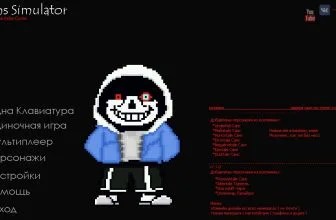
This game lets you pick what version of Sans you want to fight against. While I will always like the standard “classic” Sans character. It is cool how you can dress him up or even use Papyrus, Chara, and Toriel if you want. There is a handful of styles of Sans which is kind of fun to see.
Gameplay Loop, Mechanics, and Atmosphere in Sans Simulator
As far as the visuals go if you have played Undertale before you will love this. It looks just like it and Sans is one of the more iconic characters from that game. There is just something about his skeleton toothy grin that is appealing. Once you pick the character you want to fight, you jump into the game.
There is not really any “point” to Sans Simulator. You are just fighting Sans and trying to win. You do this by moving the little heart around and avoiding his attacks. I just used my keyboard to mess around with, but I think there is controller support as well.
Visual Style, Sound Design, and PC Optimization
It is the kind of thing that when you watch a video, it looks very, very simple. The thing is, it is pretty fast-paced and will certainly keep you on your toes while you are playing. I will say that in order to get any real satisfaction out of this, having played through Undertale is essential. Sans is an iconic character from that game, but only those who played all the way through Undertale will probably have any connection to him.
The trailer for this shows that you can play local and online multiplayer, but I could not find them in my version of the game so perhaps they are coming at a later date. I had a fun time just screwing around, fighting Sans, and seeing how well I could do. I liked being able to control his attacks too which was pretty fun.
I will say that there is not really any major point to Sans Simulator. It is one of the most memorable parts of Undertale and being able to mess around with it here is fun. Like I have said, a love for Undertale is pretty much essential, but I would certainly be very interested if they were to make another version of this with even more features.
Gamers expanding their PC library also check out our review and safe download details for DEVOUR.
Also worth checking out on Windows PC: explore our full review and official system requirements guide for Lawn Mowing Simulator.
Fans comparing performance and features across classic PC releases will also appreciate our coverage of The Witch’s House MV.
Fans comparing performance and features across classic PC releases will also appreciate our coverage of Far Cry 3.
Fans comparing performance and features across classic PC releases will also appreciate our coverage of Spintires: MudRunner.
You may also appreciate our detailed comparison, ratings, and setup notes for Job Simulator.
Fans comparing performance and features across classic PC releases will also appreciate our coverage of Crash Bandicoot N. Sane Trilogy.
Fans comparing performance and features across classic PC releases will also appreciate our coverage of Sniper Ghost Warrior 3.
Fans comparing performance and features across classic PC releases will also appreciate our coverage of Killing Floor 2.
Fans comparing performance and features across classic PC releases will also appreciate our coverage of Fate/Extella Link.
Fans comparing performance and features across classic PC releases will also appreciate our coverage of Tom Clancy’s The Division.
Fans comparing performance and features across classic PC releases will also appreciate our coverage of Dead or School.
Sans Simulator PC System Requirements
Check the verified minimum and recommended Windows hardware specifications for the Game Jolt Official Windows Freeware of Sans Simulator before installing.
| Component | Minimum | Recommended |
|---|---|---|
| OS | Windows 7 / 8 / 10 / 11 | Windows 10 / 11 |
| Processor | 1.6 GHz Dual-Core CPU | 2.0 GHz Dual-Core CPU |
| Memory | 2 GB RAM | 4 GB RAM |
| Graphics | OpenGL / DirectX 9.0c GPU (512 MB VRAM) | 1 GB VRAM GPU |
| DirectX | Version 9.0c | Version 11 |
| Storage | 250 MB available space | 500 MB available space |
If you like this style of gameplay and progression, our guide to Harvest Moon: Mad Dash covers another notable title in the same extended lineup.
Frequently Asked Questions
What type of game is Sans Simulator and who developed it?
Sans Simulator is an action game in which you fight against a character from the popular RPG game Undertale. Download it now for free. It is developed or published by NekoGlass.
Which platforms and stores offer Sans Simulator?
Official digital editions of Sans Simulator are available via gamejolt.com. Key technical details: supported platforms include Windows; storage requirement is roughly 42.9 MB; pricing follows a free model.
What are the main strengths and drawbacks of Sans Simulator?
Strongest gameplay elements include if you enjoyed undertale then this is well worth playing around with, you can fight different versions of sans and different characters, and it is very easy to jump into if you played undertale. Main drawbacks include you need to be an undertale fan to get anything from this and there are no instructions on how to actually play. Editorial score: 7/10.