XAMPP is an open-source and free web server and the acronym stands for Cross-Platform, Apache, MySQL, PHP, and Perl. XAMPP allows programmers to build and test applications locally. It was produced by Apache Friends, and its native source code can be revised or modified by anyone. It includes MariaDB, Apache HTTP Server, and PHP and Perl interpreters, among other things.
Because of XAMPP’s ease of use, a developer may quickly and easily install a WAMP or LAMP stack on a computer, with the added bonus of being able to load popular add-on software like WordPress and Joomla.
How to Download XAMPP
You can download the latest XAMPP for Windows, Linux, or OS X from the Apache Friends website. Click on the Download button below.
The Program Review
XAMPP in a Nutshell
- XAMPP can be used as a local server or host.
- This local server is installed on your computer, whether it be a desktop or a laptop.
- It’s used to test clients or websites before they’re published to a distant server.
- Moving from a local test server to a live server is simple because most real-world web server deployments use the same components as XAMPP.
XAMPP’s creators intended it to be used as a development tool, allowing web designers and programmers to test their work without having to connect to the Internet on their own machines. To keep things as simple as possible, many essential security components are disabled by default. On the Internet, XAMPP is used to serve web pages. It may also be used to create and manipulate MariaDB and SQLite databases, among others.
An FTP client can connect to a local server and treat it as if it were a distant host once XAMPP is enabled. Using a program like FileZilla to install a content management system like Joomla or WordPress. You can also connect to a local host via FTP using an HTML editor.
XAMPP’s Components
The following are the components included in the XAMPP:
Apache: It is an HTTP web server that runs on a variety of platforms. It works with packages for Windows, Linux, and Mac OS. Apache is a web server that transports data all over the internet.
Cross-Platform: On different local systems, different operating systems are installed in different configurations. This Apache distribution package’s usefulness and reach are aided by a cross-platform component.
Perl: is a dynamic and interpretable programming language. This programming language is used for web development, graphical user interface creation, system administration, and more. Perl understands HTML, XML, and other markup languages.
PHP: It is the most widely used backend programming language in web development. PHP allows users to create dynamic webpages and applications. It may be installed on any platform and supports a variety of database management systems. The C programming language was used to create it.
Maria DB Database: It is a web-based database that allows users to store, manipulate, retrieve, manage, and delete data.
PHPMyAdmin: It is a MariaDB and MySQL database management tool.
OpenSSL: OpenSSL is a free and open-source SSL and TLP implementation.
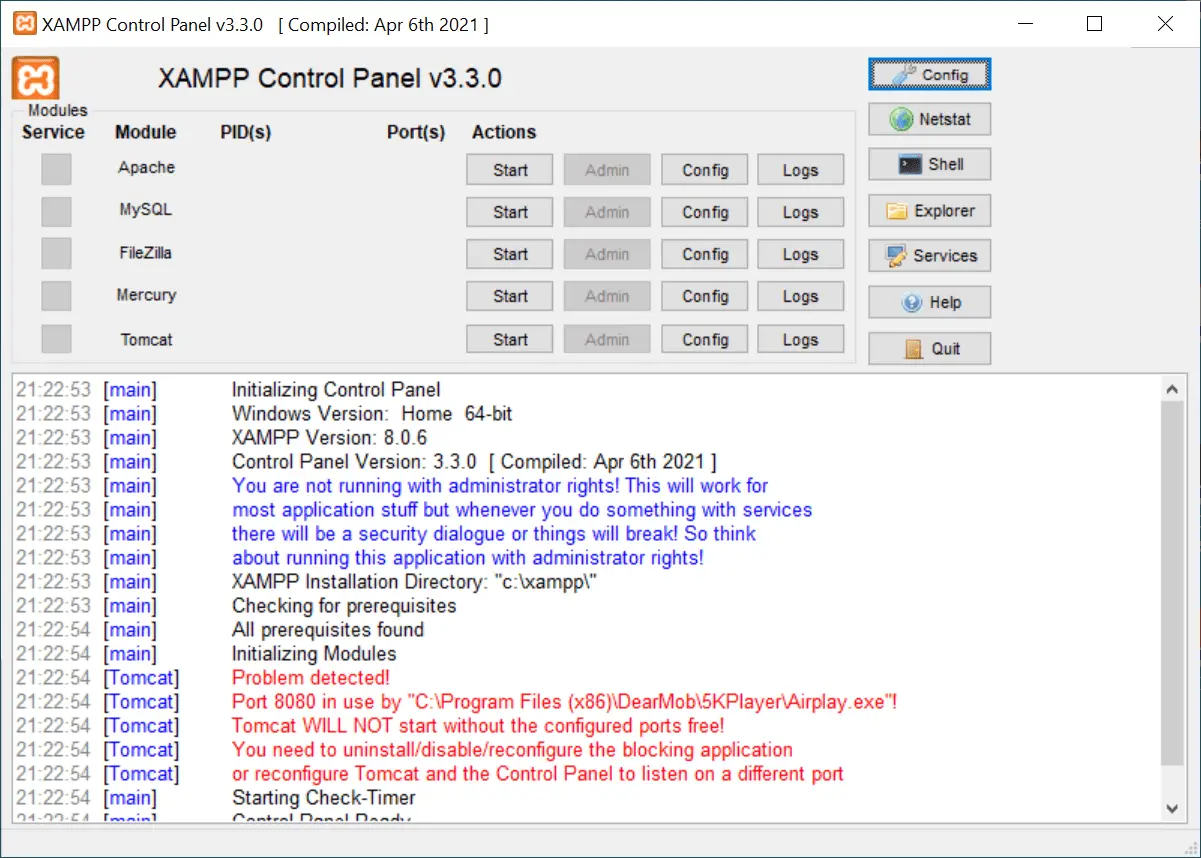
XAMPP Control Panel: The XAMPP Control Panel is a panel that aids in the control and operation of other XAMPP components. For another handy utility worth testing on your PC, take a look at Microsoft Excel 2007 and browse its full feature breakdown.
System Requirements & Key Features
Check the baseline Windows hardware specs, developer details, and license profile for XAMPP 7.4.29, 8.0.19 & 8.1.6 before installing.
| Specification | Minimum | Recommended |
|---|---|---|
| Operating System | Windows 7 / 8.1 / 10 (32-bit or 64-bit) | Windows 10 / 11 (64-bit) |
| Processor | 1.0 GHz Intel / AMD Dual-Core | 2.0 GHz+ Multi-Core CPU |
| Memory (RAM) | 2 GB RAM | 4 GB+ RAM |
| Free Disk Space | 158 MB installer + 300 MB free space | 1 GB+ SSD free space |
| Developer & License | VMware (free) | Latest verified Windows build |
Frequently Asked Questions
What is XAMPP 7.4.29, 8.0.19 & 8.1.6 and what are its main features?
XAMPP is a free set of programs that let you create a local web server. Download it now and start developing your projects on your machine. XAMPP is an open-source and free web server and the acronym stands for Cross-Platform, Apache, MySQL, PHP, and Perl, developed by VMware.
Which platforms support XAMPP 7.4.29, 8.0.19 & 8.1.6 and how is it licensed?
XAMPP 7.4.29, 8.0.19 & 8.1.6 supports Windows, Linux, and macOS, with an installer package around 158 MB available as a free download. Official downloads and release information are available via apachefriends.org.
What are the main advantages and limitations of XAMPP 7.4.29, 8.0.19 & 8.1.6?
It was produced by Apache Friends, and its native source code can be revised or modified by anyone. Overall editorial score: 9/10.