Being able to play around with mods is one of the things that many people feel put PC gaming ahead of console gaming. Today, we are looking at CurseForge which is a fantastic program that lets you mod to your heart’s content on many different popular games. As well as downloading mods, you can share your own and even benefit from doing so!
How to Download CurseForge
To download the program, click on the Download button below. If you want to check similar tools, check out also our reviews of WeMod or Vortex.
The Program Review
So what games is CurseForge compatible with? There is a solid selection of games, but the big two are Minecraft and World of Warcraft. As of writing, Minecraft currently has over 86 thousand… yes 86 thousand mods on CurseForge. The next highest amount is World of Warcraft, but that has under 10 thousand.
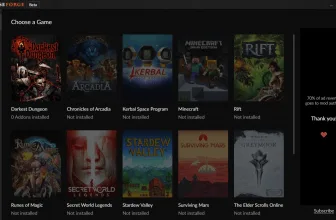
Other games supported include StarCraft II, Among Us, World of Tanks, Elder Scrolls Online, and more than a few more. It is very easy to look through all the mods and you can even search if you know what you are looking for. If you take Minecraft for example, you can select how you want the mods displayed such as by popularity or when they were created, for example.
Once you find a mod you like you just click install and let CurseForge do the rest. However, we have got a bit ahead of ourselves as before that you will need to create an account and download the program onto your computer which is easy enough to do. Actually, being easy is what CurseForge is all about, I have used mod programs in the past that were kind of clunky, but that is certainly not the case here.
With CurseForge, you have a very easy-to-follow UI. You basically pick the game you want and then select the mods that you want to load and that is pretty much it. Sometimes there may be a compatibility issue here or there, but that is to be expected when you are dealing with mods.
While playing around with the mods is great, CurseForge is very community-driven as well. You can vote for what you like, but the thing I think is really cool is the way that they reward creators. They say that mod authors get 70 percent of the revenue of the app, so if you make a mod that hits the big time, you can earn some pretty neat rewards.
Granted making mods is way above my level of understanding, but for those that are into this kind of thing, it is cool that they get rewarded for it. You may be wondering how they are able to offer rewards, well that is because this is kind of a premium service. CurseForge does have a free version, but it is supported via ads, that is the version I played around with.
There is also a subscription-based model you can look into which does away with the ads. No matter which version of CurseForge you decide to use, it is cool that creators have the chance to get rewarded for the work they do. It is probably because of this that there are so many mods on here.
If you like messing with mods and CurseForge has a game or games you like to play, give this a try. It really is very easy to use and some of the games on here have a ton of mods! They are always adding more too so this is the kind of thing that you will never be able to get truly bored of.
Players looking for another engaging PC experience can also check out our hands-on review of Super Mario Maker 2.
Gameplay Design, Features, and Core Value of CurseForge
CurseForge focuses on responsive controls, reliable stability, and rewarding mechanics suited to Windows PC setups.
Compatibility, Performance, and Overall Replayability
From setup ease and system efficiency to long-term enjoyment, CurseForge remains a dependable choice in our PC and gaming catalog.
PC System Requirements (Minimum & Recommended)
Check the verified Windows PC minimum and recommended hardware specifications for CurseForge below before downloading.
| Component | Minimum | Recommended |
|---|---|---|
| OS | Windows 10 / 11 (64-bit) | Windows 10 / 11 (64-bit) |
| Processor | Dual-core 2.0 GHz Intel or AMD x64 CPU | Quad-core Intel Core i5 / AMD Ryzen 5 or faster |
| Memory | 4 GB RAM | 8 GB – 16 GB RAM (for Minecraft / WoW modpacks) |
| Graphics | DirectX 11 / OpenGL 4.4 compatible GPU | Dedicated GPU matching modded PC titles |
| Storage | 1 GB free space for CurseForge client | 10 GB+ SSD space for modpack instances and backups |
Old School RuneScape players customizing their desktop setup with safe community plugins can also check out our dedicated guide to RuneLite.
Frequently Asked Questions
Is the CurseForge desktop app free and safe to download?
Yes. CurseForge by Overwolf is completely free and scans uploaded community mods and addons for malware before publishing them to players.
Is there a standalone CurseForge installer without Overwolf?
Yes. On Windows, CurseForge offers both the standard Overwolf-powered client and a lightweight standalone desktop option (used for World of Warcraft, Minecraft, The Sims 4, and Stardew Valley mods), while macOS and Linux versions are standalone by default.
Which games does CurseForge support?
CurseForge hosts tens of thousands of mods and modpacks for Minecraft (Java & Bedrock), World of Warcraft, The Sims 4, ARK: Survival Ascended, Palworld, Stardew Valley, and Baldur’s Gate 3.
Does CurseForge update installed game addons automatically?
Yes. You can update individual mods with one click or inspect changelogs directly inside the ‘My Mods’ tab without manually moving ZIP files.