Let me start by saying that my “electrician” experience is basically changing plugs and flipping the breakers on and off on rare occasions. Most of the negativity I have read about Electrician Simulator seems to be about how unrealistic it is. Look, if you are an electrician or at least have more experience than I do, I can see why this would be frustrating how simplified this game is.
How to Download Electrician Simulator
You can download the game from Steam. Click on the Download button below. If you like simulators, check out also our review of Construction Simulator, Train Sim World 3, or Builder Simulator.
The Game Review
Wiring Sockets, Circuit Breakers, and Workbench Repairs
However, I do think that they had to try and find a happy medium, but it seems like they have tried to appeal to those who know nothing about this stuff. As you have probably figured out, we are an electrician and we are trying to run a successful and profitable business. If you have played any of these simulator-style games before, you will feel right at home here.
You start off by taking rather simple jobs for people and you eventually can build up to rewiring entire houses and businesses. I like the way the human interaction is handled in the game with some people being easy to work with and others being complete assholes! I know firsthand that dealing with the general public can be a brutal experience and this game does capture that!
Client House Jobs vs Relaxed Sandbox Tinker Loops
Ok, so let’s talk about the repairing aspect of Electrician Simulator which makes up most of the game. You will take the job and then make sure you have the right parts, tools, and so on to complete it. It is very, very similar to other simulator games in this regard with how you buy your equipment and parts.
Let’s say you have to fix an alarm. You will need to dismantle it by removing the screws, cover, and so on and once open, you can assess the damage and figure out what you need to do. You may need to remove and replace wires, put in a new capacitor-type thing, and so on. It is all pretty easy to do and figure out, but as this is electricity we are talking about, you need to make sure your repair is right before you say it is complete.
Visual Detail, Tool Controls, and Job Variety
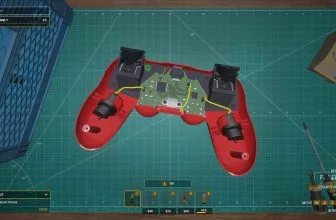
My favorite aspect of the game was doing repairs on stuff like video game controllers and other household items. Although, stuff that requires soldering is really tricky as it feels like you have to be pixel-perfect with your placement and this can be rather frustrating. The big wiring jobs (like rewiring a house) were not as enjoyable for me as they felt way more tedious.
While I am an electrician novice, I can still tell that this has been immensely simplified and that is the problem some people have with it. To be fair, I like how simple it is, but I can also see it from the other side too. One thing that pretty much everyone agrees on is that there is a lack of content in the game, after about five hours I had pretty much done everything there was to do in the game.
I would not say that Electrician Simulator is one of my favorite simulator games, but I still had some fun with it. I was most entertained when I was working at a desk fixing something like a controller. I wish that there were more jobs to do and more things to repair as you can see all the game has to offer fairly quickly. If they were to add more jobs or things to repair, I probably would jump back in.
PC System Requirements (Electrician Simulator)
Before downloading or launching Electrician Simulator on Windows PC, check the minimum system specifications below to ensure smooth frame rates and compatibility.
- OS: Windows 10/11 (64-bit)
- Processor: Intel Core i5-4590 / AMD FX 8350
- Memory: 8 GB RAM
- Graphics: NVIDIA GeForce GTX 960 / AMD Radeon R9 280
- Storage: 5 GB available space
Players and PC enthusiasts also frequently explore Sonic.EXE – The Game, Super Mario Maker 2, and Super Mario Maker on MadDownload.
For another popular PC game offering multiple tactical ways to complete every objective, read our full overview of Yandere Simulator.
Frequently Asked Questions
What tasks do you perform in Electrician Simulator on PC and consoles?
As of November 2026, Take IT Studio!’s Electrician Simulator lets you wire wall sockets, switches, and breaker panels inside customer homes while soldering and repairing gamepads, lamps, and retro gadgets at your workbench on Steam, PlayStation, Xbox, and Switch.
Which renovation and repair games appeal to Electrician Simulator fans?
Players who enjoy methodical troubleshooting and home upgrades also love House Flipper and Car Mechanic Simulator 2021.