Smart Defrag can easily be called one of the best defrag software products on the market. What is even more important Smart Defrag can be downloaded for free. IObit software speeds up access to the files on your hard drive, solving the issue of slow performing PC.
How to Download Smart Defrag
To download the latest version of Smart Defrag click on the Download button below.
Users looking for related Windows utilities in this category often compare it with Rufus and WinToFlash Lite.
The Program Features
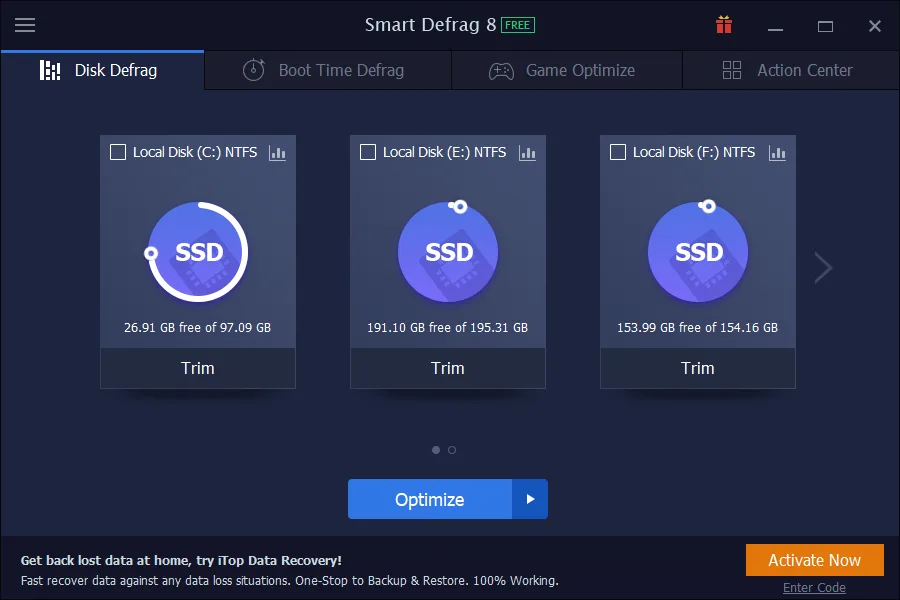
The task of optimizing the speed of the PC is done in the process of so-called defragmentation of files and folders on the hard drive. It works in the case of traditional hard drives as well as the new SSD drives. The defragmentation is done using multi-threading technology. The software rejoins the files which were written in different locations on the hard drives. As a result, the operating system is capable of accessing them faster. In practice think – faster performing games, faster applications, and less time spent copying files.
After each defragmentation process, the user can see a special report where statistics pertaining to the job are displayed. One can find there information about how many files and folders were defragmented, how many fragments they consisted of, and what was their size.
It is worth knowing that defragmentation cannot be easily done for the system files. The reason for that is that the operating system does not allow for these files to be moved as it needs to access them constantly. IObit has a solution called Boot-time Defrag. IObit Smart Defrag manages to defragment these files during system boot before Windows is able to block the files.
The software is also able to organize the files on the hard drive in a way that takes into account how often which file is used. Consequently, this guarantees even better performance gain. One should also know about a special module that is solely responsible for the optimization of the games installed on the hard drive. You should also look at Action Center – another tab in the program where other IObit programs are recommended.
Smart Defrag Pro
The button Activate which can be found in the lower right corner of the program window allows for an upgrade to the paid Pro version.
IObit’s defragmenter will perform automatic defragmentation. It also has additional features which are not available in the free version. These are Intelligent Disk Boost, Windows Registry defragmentation, or the capability to defragment only preselected files. IObit, the makers or the program maintain that Smart Defrag Pro will make our PC up to 200% faster. The users of the Pro version will be happy to know that they will receive automatic updates as well as 24/7 support.
MadDownload.com gives the program a review mark of 9.5 which looks awesome when compared to the competition: Defraggler, Piriform Defrag, or Defrag Pro.
For more tested utilities in this category, see our reviews of Temple 1.22 and Etcher 2.1.9 for Windows.
System Requirements & Key Features
Compatibility & Requirements: Requires Windows XP through Windows 11 (32/64-bit), 1 GHz processor, 512 MB RAM, and ~100 MB free disk space.
Safe SSD Trim vs. Deep HDD Block Consolidation
Smart Defrag distinguishes SATA/NVMe flash drives from spinning disks automatically, issuing Trim commands on SSDs while defragmenting multi-terabyte HDDs.
Scheduling Idle-Time Maintenance Without Slowdowns
Background priority throttling pauses disk sorting instantly whenever games or video renders start alongside top disk defragmentation tools. Users building a complete toolkit also explore Defraggler 2.22.995 in our software library.
Frequently Asked Questions
How do I download the latest version of Smart Defrag?
Click the green Download button on this page to get the official installer for Smart Defrag 12.1.
Which operating systems support Smart Defrag?
Smart Defrag runs on Windows PC; check our specification box below for exact system details.
Is Smart Defrag safe to install on my computer?
Yes, downloading Smart Defrag from verified vendor links ensures a clean, authentic installation package.
What makes Smart Defrag useful?
Rated 9.5/10 in our review, Smart Defrag combines practical tools with an approachable interface for everyday workflows.