The Sims 4: Get Together is the second official The Sims 4 expansion. The game was released In United Stated on 8 December 8, 2015, and it appeared two days later on the European market. The action in The Sims 4: Get Together takes place in the world of Windenburg (inspired by Norway and Germany), where players have the opportunity to visit many picturesque places such as:
- an adorable traditional village,
- a state-of-the-art business district,
- a lively urban market,
- and a private island.
This certainly adds variation to the game.
Generally speaking, the expansion, just like other titles of the series, gives us the ability to create our own Sim, both in terms of appearance, body shape, face, and clothes, as well as character traits.
How to Download The Sims 4: Get Together
You can download the game from Origin. To do it, click on the Download button below.
What’s New
It is worth to mention that in The Sims 4: Get Together the players have access to new clothes, and are therefore given the opportunity to choose completely different outfits than in the previous installments of the game. This gives the players an even greater range of opportunities as far as Sim creation goes.
Gameplay Loop, Mechanics, and Atmosphere in The Sims 4: Get Together
In the course of the games, we can join various social groups or create our own. Of course, each of the groups is characterized by their own style, habits, and interests, so that our Sim is able to mix with all the other Sims in the varied world of Windenburg.
Visual Style, Sound Design, and PC Optimization
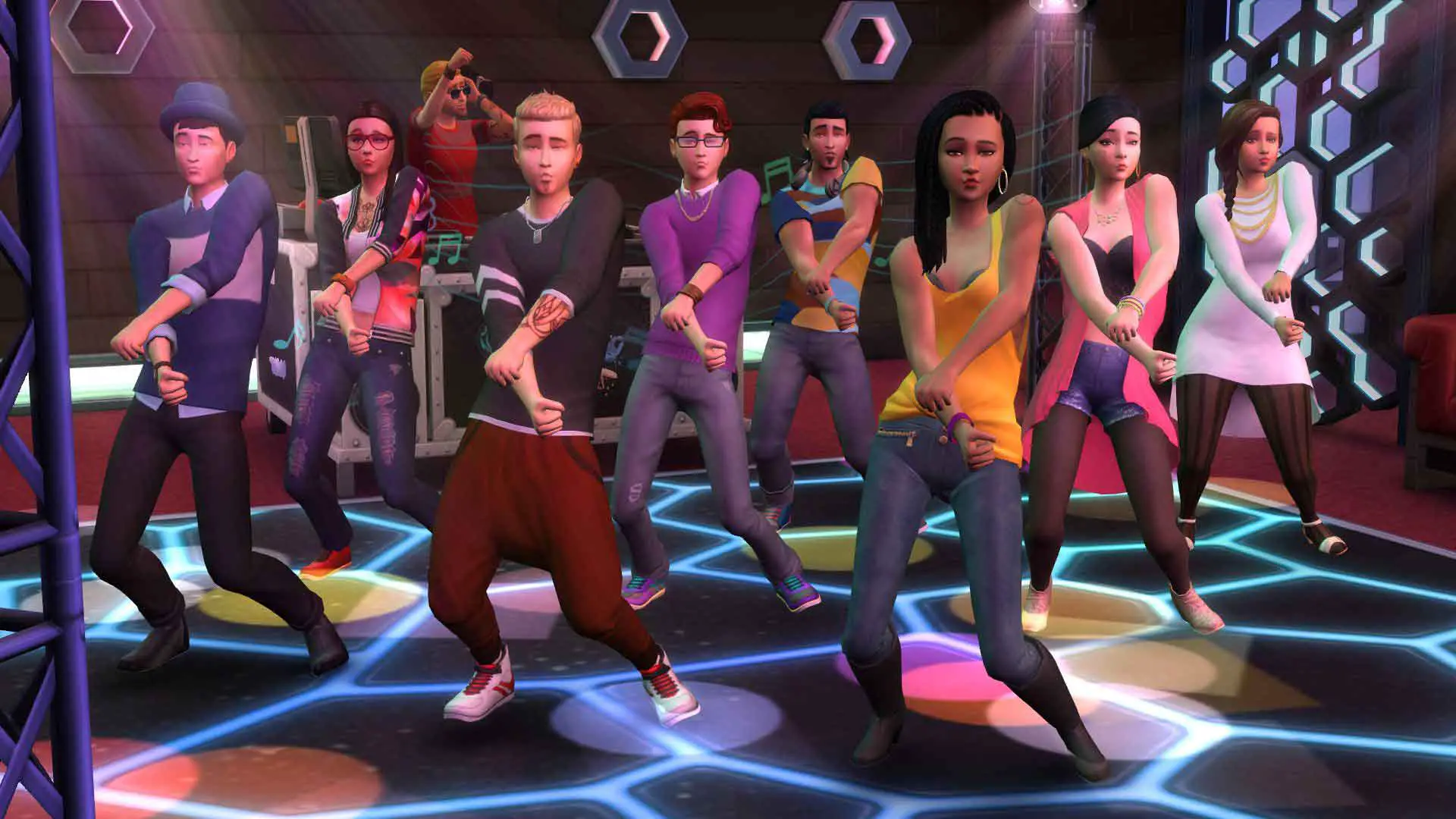
The Sims 4: Get Together allows us to organize parties where we can shine on the dance floor or show our DJ skills. This is a very interesting way of breaking free from the monotony of everyday life in Windenburg.
The new features that are introduced in the expansion, and which were not included in the previous games are:
- the above-mentioned social groups,
- the ability to swim in so-called natural pools, which are modeled on real-life examples,
- and clubs where Sims can spend their leisure time.
The Sims 4 Get Together also gives the players access to the new features that are related to the build mode, where we have the ability to equip our homes with such things as:
- light lasers,
- coffee machine,
- DJ podium,
- fireplace,
- wardrobe,
- table football,
- dart board,
- parquet,
- and the game Don’t wake the llama.
We should also mention that in this expansion we will find four music hits known from the Sims games. These are:
- Beautiful Now by Zedda (by Anton Zaslavski, the Russian-German musician),
- Expensive by the American singer Tori Kelly,
- Run Away with Me by the Canadian musician Carly Rae Jepsen,
- and the Wake Up by the British rock group The Vamps.
If you enjoy games in this genre, check out our PC reviews of Potion Craft: Alchemist Simulator and Lawn Mowing Simulator.
PC gamers looking for another classic release can explore our complete gameplay review and Windows requirements for Goat Simulator.
If you want another standout pick to check out next, read our complete Streets of Rogue review, rating, and official download guide.
The Sims 4: Get Together PC System Requirements
Check the verified minimum and recommended Windows hardware specifications from the official Steam release of The Sims 4: Get Together before installing.
| Component | Minimum | Recommended |
|---|---|---|
| Processor | 1.8 GHz Intel Core 2 Duo, AMD Athlon 64 Dual-Core 4000+ or equivalent (For computers using built-in graphics chipsets, the game requires 2.0 GHz Intel Core 2 Duo, 2.0 GHz AMD Turion 64 X2 TL-62 or equivalent) | Intel core i5 or faster, AMD Athlon X4 |
| Memory | 2 GB RAM | 4 GB RAM |
| Graphics | NVIDIA GeForce 6600 or better, ATI Radeon X1300 or better, Intel GMA X4500 or better | NVIDIA GTX 650 or better |
| DirectX | Version 9.0 | Version 11 |
| Network | Broadband Internet connection | Broadband Internet connection |
| Storage | 18 GB available space | 18 GB available space |
If you want another standout pick to check out next, read our complete World of Warcraft: Battle for Azeroth review, rating, and official download guide.
Frequently Asked Questions
Where can I get the official The Sims 4: Get Together download?
You can download the latest official build of The Sims 4: Get Together safely through the green download button on this page.
Which operating systems are compatible with The Sims 4: Get Together?
See the specification table at the bottom of this review for supported Windows, macOS, Linux, or mobile versions and license details for The Sims 4: Get Together.
Is The Sims 4: Get Together free to download and safe to use?
Our review covers the exact license model of The Sims 4: Get Together and links to verified vendor distribution channels for clean installation.
What are the key features of The Sims 4: Get Together?
Read our hands-on evaluation above for a full breakdown of The Sims 4: Get Together’s interface, performance, strengths, and limitations.