WFDownloader is a batch downloading application that will make your downloading process easier. The things that you can download include images, documents, videos, cartoons, and much more. Moreover, you can group your links and can manage them easily when they are installed.
Other than that, it’s free and allows you to grab links from various websites. However, it can help you in different ways so that you can effortlessly download the things. Whether you want to get a larger file or a smaller one, this software is an ideal choice for you.
It’s a Java-based application, that is why you don’t have to put much effort while using it. Moreover, it can work as a download manager, but keep in mind that it doesn’t allow you to transfer files.
How to Download WFDownloader
To download the program, click the Download button below this review.
The Program Review
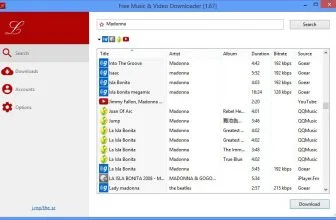
Downloading one file at a time can be time-consuming and depressing. Therefore, you need to select a download manager that will allow you to manage bulk downloading. WFDownloader App provides a simple and the fastest way to download things without wasting any time. Looking for a reliable desktop utility in a similar category? Check out our detailed review of Free Music Video Downloader (Lacey) 3.21 on MadDownload.
Core Features and Workflow in WFDownloader 0.90
Core Features and Everyday Workflow in WFDownloader
System Requirements & Key Features
Check the baseline Windows hardware specs, developer details, and compatibility profile for WFDownloader before installing.
| Specification | Minimum | Recommended |
|---|---|---|
| Operating System | Windows 7 / 8.1 / 10 (32-bit or 64-bit) | Windows 10 / 11 (64-bit) |
| Processor | 1.0 GHz Intel / AMD Dual-Core | 2.0 GHz+ Multi-Core CPU |
| Memory (RAM) | 2 GB RAM | 4 GB+ RAM |
| Free Disk Space | 48.8 MB installer + 300 MB free space | 1 GB+ SSD free space |
| Developer & License | WFDownloader (free) | Latest verified Windows build |
Frequently Asked Questions
What is WFDownloader and what are its main features?
WFDownloader is a program that will organize your file downloads. Get it now and easily download many files at once. WFDownloader is a batch downloading application that will make your downloading process easier.
Which platforms support WFDownloader and how is it licensed?
WFDownloader supports Windows, Linux, and macOS, with an installer package around 48.8 MB available as a free download. Official downloads and release information are available via wfdownloader.xyz.
What are the main advantages and limitations of WFDownloader?
Moreover, you can group your links and can manage them easily when they are installed. Overall editorial score: 9/10.
You can easily grab the links from different websites and choose the bulk downloading process. This method doesn’t require much time and makes sure that you can get all the files in no time.
Whether you want to download two files or hundreds of items, this software will not let you down. In case you are not sure about the websites it supports, don’t worry because you can check its documentation and website to find out the information related to sites.
The Key Features of WFDownloader
It offers decent features so everyone can use it without facing any issues. The important elements of this program are as follows.
- Easy-to-Manage
It has a straightforward and easy-to-use interface. That means you can easily manage it without facing any issues. It also allows you to do advanced things.
- Batch Downloading Option
This is the main function of this software, which makes it different from other downloading managers. You can add hundreds of links to download the files. The batch mode feature is useful and allows you to get the files in no time.
- Generate Sequential Files
It helps you to download sequential files, so you don’t have to add them one by one. All you have to do is add the links to this application, and it will manage the things accordingly.
- Download Files on System
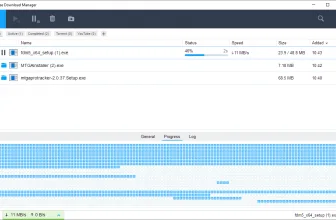
You can download 20 different files simultaneously, which means that once the application is done with downloading all the links, you can easily select the location and get 20 files together. This process will save you a lot of time.
- Password Protected Sites
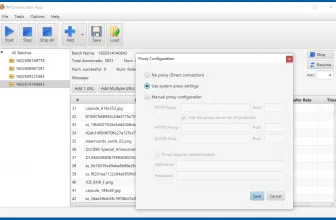
This tool also allows you to get files from password-protected sites. Yes, you heard it right. Using it, you can log in to your site and can get the content in no time. You can also import cookies so that you don’t have to enter login details whenever you grab links from password protected sites.
- Export Links
Some links can expire after some time; therefore, you can save them for your research by choosing the export option. It supports the text and HTML formats.
Final Verdict
If you don’t like downloading things one by one, we recommend you to use WFDownloader. It’s a user-friendly application and doesn’t require much expertise. Just run the app, and you are ready to use it.