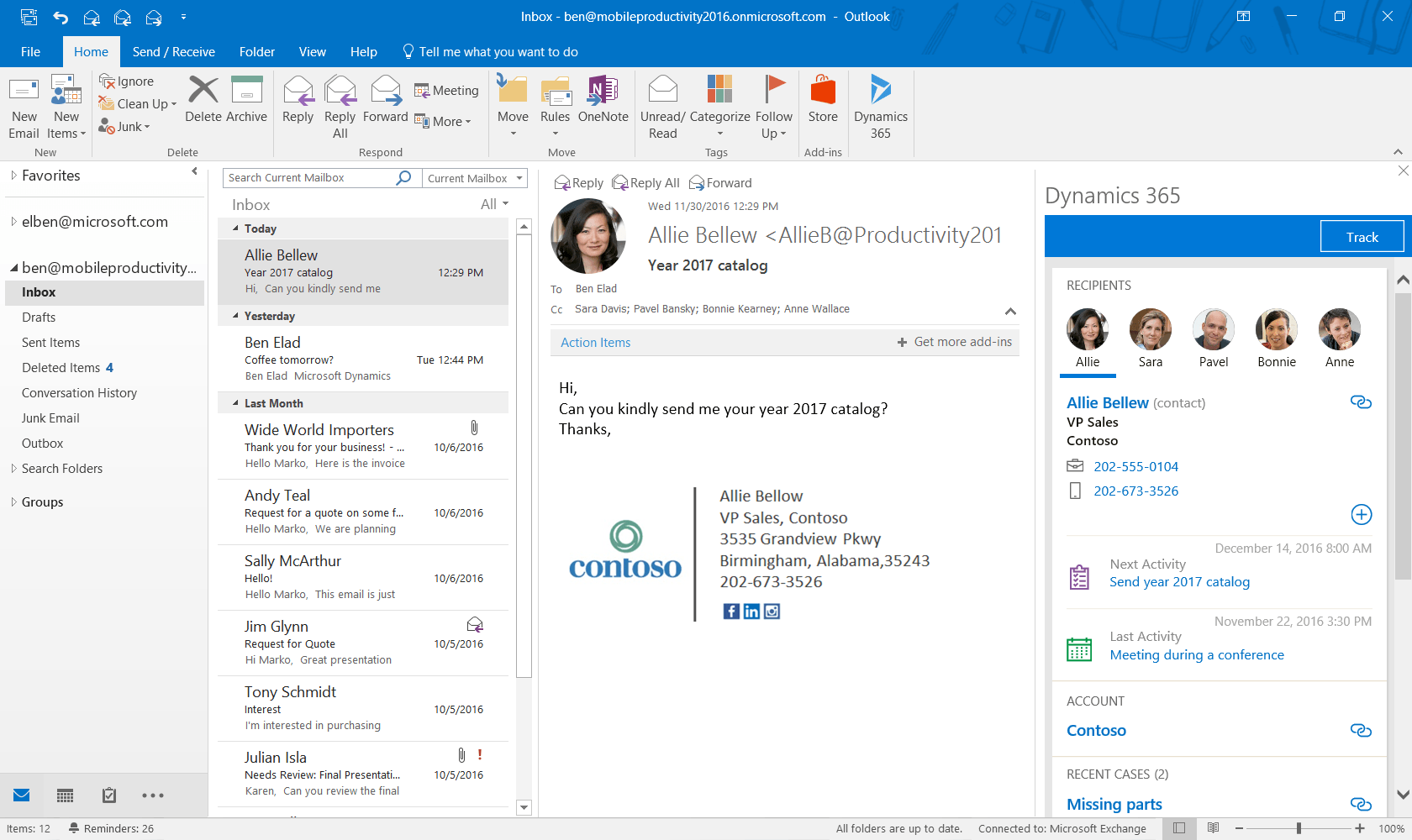
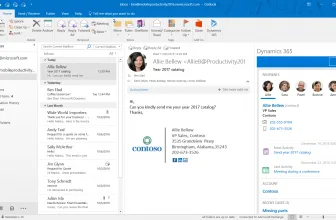
Microsoft Outlook 2016 is an email client with the built-in calendar. It can be downloaded as a separate program or as a part of Microsoft Office 2016 suite which was released in late 2015. It is also included in Office 365.
How to Download Microsoft Outlook 2016
To download the latest version of Microsoft Outlook, click on the Download button below.
An Email Software Which is Easy to Use
In Outlook 2016 Microsoft introduced a series of new functionalities, which facilitate the daily work with the program. One of them is messages filters for all messages and unread messages. With one click we can also mark a message as read or unread.
Another feature is the capability to freely sort email folders. Up to this point, such folders were sorted automatically in alphabetical order. Now we can rearrange them with a mouse.
The process of looking for email messages has been also streamlined. Once we type in what we are looking for in the title of the message, we can filter our query by typing what we expect to find in the body.
What has been improved on many levels is the process of sending out the messages. Now when we click on Reply, Reply To All or Forward, no new window will pop up on the screen by default. This alone saves time and reduces clutter. In this new setup, we simply type in the same window at the top of the previous message. There is also a new option Reply & Delete. After all the messages which we would like to remove from our Inbox after replying to are not that uncommon.
It is extremely easy now to delete messages. Now when we hover over a message on the messages list a red cross appears. Clicking on it removes the chosen email. In a similar fashion, we can now hover over a calendar event to find out what exactly was scheduled. Before Outlook 2016 we had to double-click on the event box.
Microsoft Outlook 2016 – the Common Office New Features
in Microsoft Outlook 2016 one can also find new capabilities that are shared among the Office applications. One such feature is Tell me, what you want to do box. A point can be made that is a help system on steroids. Rather than telling us how to do things it basically does them for us. When we type in a name of a command we want to give, it shows as a list of items related to our request. It is then enough to click and we achieve what we wanted.
The second common feature is Smart Lookup. When we encounter a phrase we would normally want to search for on the Internet, now we select it and choose Smart Lookup command. A Bing pane appears within Microsoft Outlook 2016 and we can copy all the text and images inside the body of our email.
For more tested utilities in this category, see our reviews of Mozilla Thunderbird 102.0.1 and MailsDaddy MBOX to PST Converter 7.1 for Windows. You can also explore our full guide and specs for ExplorerMax 2.0.3.30.
Popular picks our readers frequently visit alongside this review include Jurassic Park, Slap the Fly, and Marvel’s Spider-Man.
System Requirements & Key Features
Compatibility & Requirements: Requires Windows 7 SP1 through Windows 10 or Server 2008 R2-2016, 1 GHz x86/x64 processor, 2 GB RAM, 3 GB free disk space, and DirectX 10 GPU for hardware acceleration.
Rules, Quick Steps, and Offline Mailbox Caching
Busy professionals automate folder sorting with multi-condition Rules and One-Click Quick Steps while keeping full message history searchable offline via local PST/OST stores.
Calendar Sharing and Add-In Extensibility
Outlook 2016 integrates meeting scheduling, timezone overlays, and COM add-ins across enterprise Windows deployments alongside complementary productivity software. Users building a complete toolkit also explore Auto Email Sender in our software library.
For a complementary desktop tool in the same Windows workflow, check our full review and requirements for Smart DNS Changer & MAC Address Changer 4.7.2.
For a complementary desktop tool in the same Windows workflow, check our full review and requirements for vanBasco's Karaoke Player 2.53.
For a complementary desktop tool in the same Windows workflow, check our full review and requirements for PrinterShare 2.4.10.
You may also appreciate our detailed comparison, ratings, and setup notes for DAEMON Tools Lite 12.6.0.2470.
For a complementary desktop tool in the same Windows workflow, check our full review and requirements for DearMob iPhone Manager 6.
System Requirements & Key Features
Check the baseline Windows hardware specs, developer details, and compatibility profile for Microsoft Outlook 2016 before installing.
| Specification | Minimum | Recommended |
|---|---|---|
| Operating System | Windows 7 / 8.1 / 10 (32-bit or 64-bit) | Windows 10 / 11 (64-bit) |
| Processor | 1.0 GHz Intel / AMD Dual-Core | 2.0 GHz+ Multi-Core CPU |
| Memory (RAM) | 2 GB RAM | 4 GB+ RAM |
| Free Disk Space | 3 GB installer + 300 MB free space | 1 GB+ SSD free space |
| Developer & License | Microsoft (full version) | Latest verified Windows build |
For a complementary desktop tool in the same Windows workflow, check our full review and requirements for Teleport Pro 1.72.
For a complementary desktop tool in the same Windows workflow, check our full review and requirements for iConStruct 1.2.0.
For a complementary desktop tool in the same workflow, check our full review and requirements for Faceless.ME VPN.
Frequently Asked Questions
Is Microsoft Outlook 2016 still supported on Windows and Mac in 2026?
As of November 2026, Microsoft Outlook 2016, the commercial desktop email and calendar client launched by Microsoft in September 2015 for Windows and macOS inside Office 2016, has passed its October 14, 2025 extended end-of-support date and no longer receives security updates.
What productivity tools did Outlook 2016 introduce for daily email?
Supporting Exchange, Microsoft 365, IMAP, and POP3 accounts with local .pst and .ost storage, Outlook 2016 added one-click OneDrive and SharePoint cloud attachments, Clutter inbox prioritization, Office 365 Groups integration, fast Windows Search indexing, and the Tell Me ribbon assistant.
Does Outlook 2016 work with modern Gmail and Exchange sign-in rules?
Because Microsoft Exchange Online, Outlook.com, and Google Workspace now enforce modern OAuth 2.0 authentication and TLS 1.2+ encryption, unpatched Outlook 2016 builds often encounter connection blocks on Windows 11, though archived .pst files import cleanly into Office 2024 or Microsoft 365.
What other classic Microsoft Office application is covered on MadDownload?
Users comparing legacy desktop Office releases for offline document or slide compatibility can also view our guide to Microsoft PowerPoint 2007 on MadDownload.