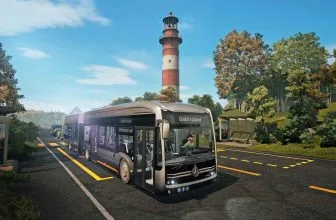
As the sixth game in the series and a direct sequel to the 2018 game, Bus Simulator 21 is offering more of the same, but better. People who get a kick out of the idea of being behind the wheel of a massive bus and making sure things are running as they should are going to get a real kick out of this game.
How to Download Bus Simulator 21
To download the game from Steam, Playstation Store, or Microsoft Store, click on the Download button below. Check out also our review of Bus Simulator 18, and Bus Simulator 16 – the previous games by stillalive studios.
The Game Review
The first thing to note is that we have a brand-new city to drive around in called, Angel Shores. Angel Shores is a fictional city, but it is based in the San Francisco Bay Area and that is pretty cool. It is a large and very diverse city that brings with it a whole bunch of navigation, scheduling, and traffic problems for you to deal with.
As well as Angel Shores, Bus Simulator 21 also brings the map from Bus Simulator 18, European Seaside Valle map as well. This is not just a copy and pastes job either, some changes have been made to make it look better and also offer players a new challenge as well.
There are more licensed busses than ever before in Bus Simulator 21. You have over 30 busses that you can drive and for the first time, double-decker and electric busses are added to the mix. The driving takes a little while to get used to, but it feels more skill-based and patience is really the key are rushing is always going to lead to a whole bunch of costly mistakes.
While driving your passengers from point a to point b is clearly the main goal of what you have to do. Bus Simulator 21 offers a very interesting and more refined manager mode. Here you have to plan various bus routes, check out different bus dealers to buy new busses, keep your busses running and make sure that the books are balanced all the while delivering a professional public transport service.
Driving the busses is of course what you will want to do, but as you expand and have more and more busses operating at the same time, you can take a more hands-off approach. The cool thing about this is that you can jump into any one of your busses at any time and take direct control of it.
I like how Bus Simulator 21 throws a lot of curveballs your way to keep you on your toes. More advanced AI in terms of the pedestrians and other vehicles on the street as well as troublesome weather can lead to issues with you keeping your bus service running nice and smooth.
Visually, I have to say that not a ton has changed since the last game, but it still looks decent enough. There is a fair bit of customization that you can do here to each bus such as changing advertising and various colors. It is worth noting that there is multiplayer available in Bus Simulator 21, but I never got the chance to experience it while I was playing it for this review.
I think it is more than fair to say that if you liked Bus Simulator 18, you will love Bus Simulator 21. Granted it is not reinventing the wheel with what it is doing, but it is certainly a bigger and better experience than what we had before. Still, if driving busses is not your idea of fun and the last few games never interested you, then I do not see this one winning you over either.
Core Gameplay and Progression
Bus Simulator 21 delivers focused PC gameplay built around responsive controls, balanced progression, and replayable sessions suited to both solo players and longtime genre fans.
Graphics, Audio, and PC Optimization
On Windows systems, Bus Simulator 21 scales cleanly across mid-range and modern hardware, pairing detailed environments with adjustable display settings and clear audio cues.
PC Installation, Performance, and Setup Tips
Before installing Bus Simulator 21 on Windows, verify free disk space, update your GPU drivers, and use the official digital storefront or publisher release linked on this page.
PC System Requirements (Minimum & Recommended)
Check the official Windows PC minimum and recommended hardware specifications for Bus Simulator 21 below before downloading.
| Component | Minimum | Recommended |
|---|---|---|
| OS | Windows 10 64-Bit | Windows 10 64-Bit |
| Processor | Intel Core i3-2120 / AMD Phenom II X4 830 or equivalent | Intel Core i5-4440 / AMD FC-8140 or equivalent |
| Memory | 8 GB RAM | 8 GB RAM |
| Graphics | NVIDIA GeForce GTX 760 (2GB VRAM) / AMD Radeon R9 280 (2GB VRAM) or higher | NVIDIA GeForce GTX 1070 (8GB VRAM) / AMD Radeon RX Vega 56 (8GB VRAM) or higher |
| DirectX | Version 12 | Version 12 |
| Network | Broadband Internet connection | Broadband Internet connection |
| Storage | 18 GB available space | 18 GB available space |
Players exploring similar PC favorites can also check our full review and system requirements for ASTRONEER.
Frequently Asked Questions
Where can I download Bus Simulator 21 officially for PC or console?
You can get the official digital edition of Bus Simulator 21 through verified digital storefronts linked via the availability button on this page.
What are the minimum system requirements for Bus Simulator 21?
Check the specification table below the article for the full minimum and recommended PC hardware requirements, supported operating systems, and installation size for Bus Simulator 21.
Is Bus Simulator 21 worth playing?
Our detailed review breaks down the core gameplay loop, visual presentation, performance, and replay value so you can decide if Bus Simulator 21 fits your style.
Does Bus Simulator 21 support controllers and cloud saves?
Official digital releases of Bus Simulator 21 include standard gamepad support and automatic cloud save synchronization on compatible platforms.