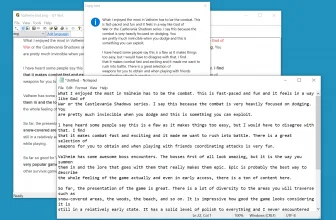
I have to start by stating that GT Text is completely free and it is the kind of software that comes in way handier than you would think. Have you ever had a picture, document, letter, PDF, or something else and wished you could copy a piece of text from it? Well thanks to this GT Text software, now you can.
How to Download GT Text
You can download the program upon clicking the Download button that is located below this review.
The Program Review
The way that this works is with some of the most advanced OCR text recognition software ever created. What this means is that when there is an image or whatever on the screen, it can tell what is text, and then it lets you copy and paste it anywhere you like. It is the kind of thing that you will use way more than you probably think.
Let’s say for example you have an advertisement for shoes and you want to copy a quote that is on it. Once you have loaded the software, you then highlight the area that has text in it and the program will handle all the rest. It takes no time at all and it can support the better part of 100 languages.
I found this really cool Captain America t-shirt that had a slogan on the back which was written in a strange font. I used this software to copy it and it worked like a charm! I was actively trying to trip it up and it still managed to recognize the text and it was correct every time I used it!
Another really cool way that this GT Text software can work is with scanned documents.- If you have a scanner, you can scan a picture, a document, or whatever, open up the software, and again get it to copy any text you want. It even works if you were to use your phone as a makeshift camera. Any image you throw this thing’s way, it is more than likely going to be able to read the text.
They have made this software as easy to use as possible. While I found it to be pretty intuitive, they do have videos and plenty of tools and tips to help you out. The most recent version is very quick and from what I understand they are still going to be releasing updates for this software in the future.
The GT Text software is well worth downloading for your computer. It is completely free and if you need to take text from pictures, documents, or whatever, it is going to make your life so much easier. It takes up next to no space on your computer and it honestly could not be any easier to use. For another handy utility worth testing on your PC, take a look at MP3 Diags and browse its full feature breakdown.
System Requirements & Key Features
Check the baseline Windows hardware specs, developer details, and compatibility profile for GT Text 2.02 before installing.
| Specification | Minimum | Recommended |
|---|---|---|
| Operating System | Windows 7 / 8.1 / 10 (32-bit or 64-bit) | Windows 10 / 11 (64-bit) |
| Processor | 1.0 GHz Intel / AMD Dual-Core | 2.0 GHz+ Multi-Core CPU |
| Memory (RAM) | 2 GB RAM | 4 GB+ RAM |
| Free Disk Space | 13 MB installer + 300 MB free space | 1 GB+ SSD free space |
| Developer & License | SOFTOCR (free) | Latest verified Windows build |
Frequently Asked Questions
What is GT Text 2.02 and what are its main features?
GT Text is a free tool for image text recognition. Download it now and use the OCR power to boost your productivity. Have you ever had a picture, document, letter, PDF, or something else and wished you could copy a piece of text from it?, developed by SOFTOCR.
Which platforms support GT Text 2.02 and how is it licensed?
GT Text 2.02 supports Windows XP, Windows Vista, Windows 7, and Windows 8, with an installer package around 13 MB available as a free download. Official downloads and release information are available via web.archive.org.
What are the main advantages and limitations of GT Text 2.02?
Key highlights include this software is free to download and use, it is very simple to use, and it is very handy for getting text from various sources. Limitations noted during evaluation include some people may have trouble with a few of the more advanced features and no word on when more languages will be added. Overall editorial score: 9/10.