I have to say that Potion Craft: Alchemist Simulator is one of the most interesting premises for a game I have come across in quite some time. The idea is that you are an alchemist trying to make a success of your potion shop offering various potions to the town’s folk. The last time I played as an alchemist in a video game was playing as Pop Fizz in Skylanders, but something tells me this is going to be a lot deeper!
How to Download Potion Craft: Alchemist Simulator
To download the game from Steam, click on the Download button below. Check out also our reviews of other interesting simulator games, such as PowerWash Simulator or Bus Simulator 21.
The Game Review
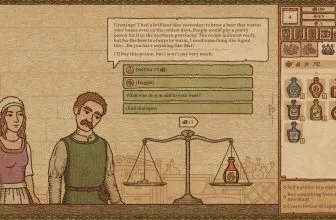
The way the game works is that you have a little shop and the townspeople will come by and want you to make them various potions. Each one has a story and sometimes it can be something simple like, they have a bad stomach or they want you to make something to help their crops grow or something like that.
You can even get tasked to do more “dangerous” stuff like making potions that are clearly desired so that the person buying them can cause harm to someone else! You can happily make someone a batch of poison, but doing so can make your reputation go down, so there is a delicate balancing act.
You want to take on as many jobs as you can, but do you want to get a reputation as an alchemist that dabbles in the dark arts? Oh, you do, well by all means go ahead! That is part of the fun, you get to be the kind of potion maker that you want to be, you can be kind and wise, or just out for money and willing to take on any job to get it!
You need to mix various ingredients into a cauldron, but rather than some mini-game. Your potion goes on a literal journey via a map screen. Each ingredient you add to the potion will make it move along the map, becoming something new as it goes. You can try and get creative and see where it takes you, but there is also the chance, it can all go boom and disappear.
You can usually see a bit ahead so you can get a fair idea of what your potion will become. However, if you do find that you have gone too far, adding some water can let your potion go back a step or two on the map. It is a fun system and I will admit that I thought for sure it would be some kind of button mashing minigame to mix potions so this was a nice surprise.
I love the visual style of Potion Craft: Alchemist Simulator as it has a lot of charm. They were inspired by actual medieval manuscripts and journals when designing the look of the game, so that is pretty cool. It has a rather unique look to it and that is a huge part of what I think is so appealing about the game.
I was not sure what I was getting into with Potion Craft: Alchemist Simulator, but I can say that I like it. The game is still in early access so from what I understand, more features are to be added. Still, what is here right now is a lot of fun and I think that this is a game that is well worth your time.
Gamers expanding their PC library also check out our review and safe download details for Baldi’s Unreal Basics in Education and Learning (COMPLETE).
Core Gameplay and Progression
Potion Craft: Alchemist Simulator delivers focused PC gameplay built around responsive controls, balanced progression, and replayable sessions suited to both solo players and longtime genre fans.
Graphics, Audio, and PC Optimization
On Windows systems, Potion Craft: Alchemist Simulator scales cleanly across mid-range and modern hardware, pairing detailed environments with adjustable display settings and clear audio cues.
PC Installation, Performance, and Setup Tips
Before installing Potion Craft: Alchemist Simulator on Windows, verify free disk space, update your GPU drivers, and use the official digital storefront or publisher release linked on this page.
PC System Requirements (Minimum & Recommended)
Check the official Windows PC minimum hardware specifications for Potion Craft: Alchemist Simulator below before downloading.
| Hardware | Minimum |
|---|---|
| OS | Windows 10 |
| Processor | Intel i3-6100 or equivalent |
| Memory | 8 GB RAM |
| Graphics | GeForce GTX 670 / Radeon HD 7970 |
| DirectX | Version 10 |
| Storage | 2 GB available space |
If you want another standout pick to check out next, read our complete Game Dev Tycoon review, rating, and official download guide.
If you want another standout pick to check out next, read our complete FIA European Truck Racing Championship review, rating, and official download guide.
Frequently Asked Questions
Where can I download Potion Craft: Alchemist Simulator officially for PC or console?
You can get the official digital edition of Potion Craft: Alchemist Simulator through verified digital storefronts linked via the availability button on this page.
What are the minimum system requirements for Potion Craft: Alchemist Simulator?
Check the specification table below the article for the full minimum and recommended PC hardware requirements, supported operating systems, and installation size for Potion Craft: Alchemist Simulator.
Is Potion Craft: Alchemist Simulator worth playing?
Our detailed review breaks down the core gameplay loop, visual presentation, performance, and replay value so you can decide if Potion Craft: Alchemist Simulator fits your style.
Does Potion Craft: Alchemist Simulator support controllers and cloud saves?
Official digital releases of Potion Craft: Alchemist Simulator include standard gamepad support and automatic cloud save synchronization on compatible platforms.