As my wife is a teacher, I get to play around with many types of interesting pieces of software. Today I am taking a look at this interesting Batch Excel to PDF Converter that is something my wife has found very easy to use. I feel if you work in an office and you do a lot of work with PDFs then this is the kind of software that is well worth having on your computer.
How to Download Batch Excel to PDF Converter
You can download the program by clicking the Download button below. Check out also PDF to Excel Converter, which is a program by the same company.
The Program Review
The idea of this is that you take a Microsoft Excel document and then you convert it into a PDF. It is the kind of thing that should be simple to do, but it can be a real pain in the butt to do it via Microsoft Office. With this Batch Excel to PDF Converter, it makes the whole process as easy as possible.
Core Features and Workflow in Batch Excel to PDF Converter 1.2
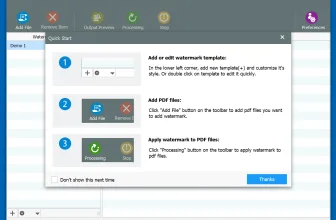
With this software, you can do more than just take on a single Excel document and convert it to a PDF. You can do an individual file if you want, but where this really shines is the way that it deals with bulk Excel documents. You can take a bunch of Excel documents and set them off to convert to PDF with just a couple of clicks.
Performance, Usability, and Final Verdict
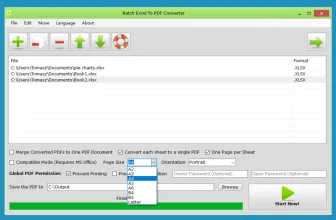
You have different options at your disposal too. For example, let’s say you have five Excel documents on your computer and you need these to be in one PDF, this can make that happen! You just select the Excel files that you want and then you select the option to Merge Converted PDFs to One Document and it will do that. For another handy utility worth testing on your PC, take a look at PDF-XChange Editor 11.1.2.0 and browse its full feature breakdown.
System Requirements & Key Features
Check the baseline Windows hardware specs, developer details, and compatibility profile for Batch Excel to PDF Converter 1.2 before installing.
| Specification | Minimum | Recommended |
|---|---|---|
| Operating System | Windows 7 / 8.1 / 10 (32-bit or 64-bit) | Windows 10 / 11 (64-bit) |
| Processor | 1.0 GHz Intel / AMD Dual-Core | 2.0 GHz+ Multi-Core CPU |
| Memory (RAM) | 2 GB RAM | 4 GB+ RAM |
| Free Disk Space | 36.2 MB installer + 300 MB free space | 1 GB+ SSD free space |
| Developer & License | PDFExcelConverter.com (free) | Latest verified Windows build |
If you want another standout pick to check out next, read our complete AMT – Auto-Movie-Thumbnailer v12 review, rating, and official download guide.
Frequently Asked Questions
What is Batch Excel to PDF Converter 1.2 and what are its main features?
Batch Excel to PDF Converter is a program that lets you quickly convert several Excel spreadsheets into portable document format files. Check out also PDF to Excel Converter, which is a program by the same company., developed by PDFExcelConverter.com.
Which platforms support Batch Excel to PDF Converter 1.2 and how is it licensed?
Batch Excel to PDF Converter 1.2 supports Windows XP SP3, Windows Vista, Windows 7, and Windows 8, with an installer package around 36.2 MB available as a free download. Official downloads and release information are available via pdfexcelconverter.com.
What are the main advantages and limitations of Batch Excel to PDF Converter 1.2?
Key highlights include this software is free to download, the way it can convert excel documents in bulk is cool, and it has some pretty neat features you can use. Limitations noted during evaluation include a few of the features feel kind of pointless and if you do not deal with pdfs at all, this software is useless to you. Overall editorial score: 9/10.
No matter if you want one PDF, multiple PDFs or even if you have a ton of Excel documents you need to convert, this software does it. Not only does it do it, but this software also does it fast and it could not be any easier to use. I have been dragging the files I want to convert, but there is also a big plus button that you can use to select files if you want.
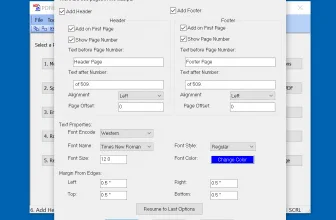
The Batch Excel to PDF Converter is packed with features. While I have just been messing with the Excel to PDF stuff, it does offer a few other neat features too. You can change the size and page orientation, set password and security options, it also can be used with Word, and PowerPoint documents as well.
One thing that is pretty cool is that you do not even need to have MS Office or Excel on your computer to use this, why you would be in a position to need this software and not have Office I do not know. However, this “feature” is there for you if you do need it. The Batch Excel to PDF Converter is a neat little piece of software that is well worth downloading to your computer.